

Investor Relations is rolling out gradually. If you don’t see Investor Pipeline, Funds, Limited Partners, or Fundraising Processes in your sidebar yet, it hasn’t been turned on for your organization — reach out to support@metal.ai to enable it.
Investor Relations records
Investor Relations adds three record types in its own sidebar section:- Funds — the investment vehicles your firm manages. Each fund has a detail page with status, currency, target and committed capital, close dates, strategy, and description.
- Limited Partners — investors and prospective investors in your funds. LPs can be linked to a company record, hold primary and consultant contacts, and carry strategy and geography preferences.
- Fundraising Processes — active capital raises. Each process links a fund to the limited partner you’re raising from, has its own status and stage, and tracks the probability of closing along with expected and actual close dates.
Common IR fields
IR records include fields that help you prioritize relationships and preserve fundraising context:- Notes and Tags capture context that should travel with a fund, limited partner, or fundraising process.
- Priority helps you rank limited partners and fundraising processes separately from the probability of closing.
- Last Activity shows the most recent recorded touchpoint for a fundraising process. The accompanying Hot, Medium, or Cold badge summarizes recency. Hover the date to review recent activity. Connected Microsoft Exchange mail and meetings can populate this when Metal relates them to the process, its limited partner, or its contacts.
- Source Type, Source Company, and Source Created At preserve how a limited partner or fundraising process entered your pipeline.
- Soft Circled tracks preliminary interest on a fundraising process separately from committed capital.
- Location stores a limited partner’s address in structured fields such as city, region, postal code, and country.
Track fundraising on the Investor Pipeline
The Investor Pipeline sits in the sidebar next to Active Pipeline. It is the operating surface for active fundraising: one card per process, typically a limited partner you are raising from for a fund.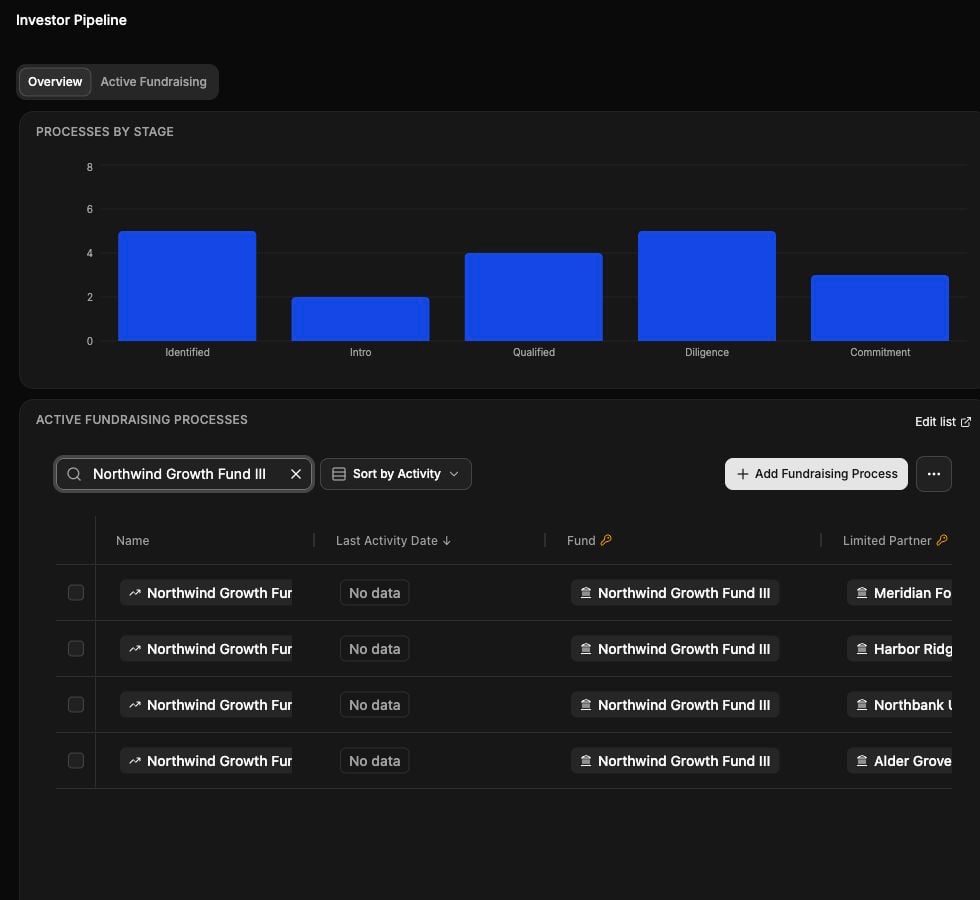
The Investor Pipeline overview, captured in staging with a fictional fund and LP pipeline.
1
Open Investor Pipeline
Select Investor Pipeline in the sidebar. The Overview tab shows fundraising dashboards. The Active Fundraising tab shows the processes themselves.
2
Switch between list and board
On Active Fundraising, use the view toggle to switch between the list and the Kanban board. Each board column is a fundraising stage. The board is the default view.
3
Move a process between stages
Drag a card from one stage column to another to advance it. Dragging requires edit permission on investor-relations records. Click a card to open the fundraising process detail page.
Active Fundraising is backed by a Metal list named Active IR Pipeline. That list includes fundraising processes with an Active status. Saved views, search, and sorts on the list also apply on the board, so toggling between the two does not reset your filters. See Save and use views.
Unlike the deal pipeline, Investor Pipeline does not have a My Deals toggle. Some organizations can view the pipeline but cannot edit cards or list cells yet — if a field is read-only, editing may not be enabled for your firm. Contact support@metal.ai for help.
Add a fundraising process from the pipeline list
When the Active Fundraising list appears as a widget, it shows a single + Add Fundraising Process button next to the … menu. Use it to add a process without leaving the pipeline.1
Open the picker
Click + Add Fundraising Process. Metal opens a picker of fundraising processes.
2
Add an existing process or create a new one
Click Select fundraising process to open the list, then search for an existing process and select it to add it to the list. To start a new raise, choose Create New Fundraising Process. Metal opens the Create Fundraising Process dialog, and after you save, Metal opens the new process.
Configure the pipeline overview
The Overview tab uses your organization’s default Investor Pipeline dashboard. Admins can change that default under Settings → Firm Guidance → Default Dashboards. See Dashboards and Workspace settings.Fund, LP, and fundraising process detail pages
Each record has a full detail page (for example,/funds/{id}) with a dashboard-style layout and inline-editable fields. From the detail page you can:
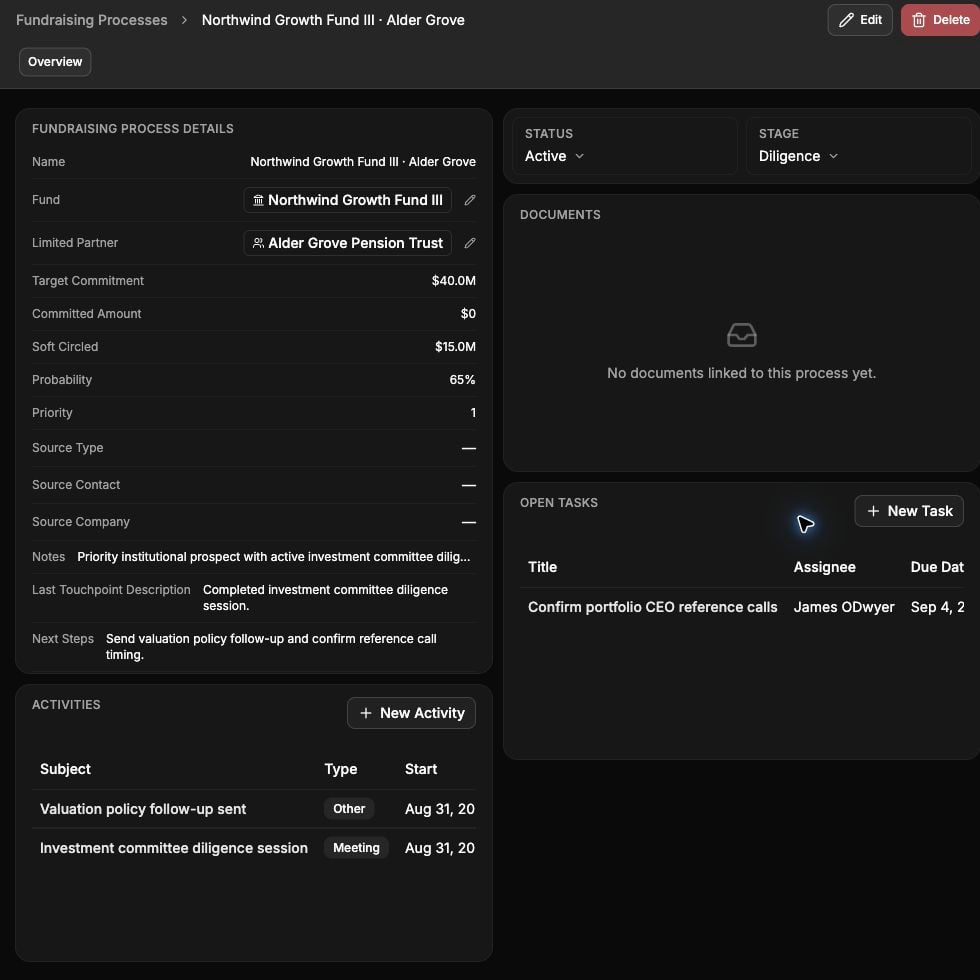
A fundraising process detail page, captured in staging with fictional demonstration data.
- Click any field on the detail card — status, stage, currency, close dates, description, linked fund or LP — to edit it in place. Foreign-key fields (fund on a process, limited partner on a process) open a search picker.
- Use Edit in the header to open a full edit dialog, or Delete to remove the record.
- On limited partner and fundraising process pages, use Merge to combine a duplicate into another record. See Merge duplicate LPs and fundraising processes.
- See any custom fields your admins have added to that record type.
- As an admin, use Customize Dashboard in the header to open the matching section of Settings → Firm Guidance → Default Dashboards. See Customize IR detail page dashboards.
If fields on a detail card are read-only, inline editing may not be enabled for your organization. Contact support@metal.ai for help.
Customize IR detail page dashboards
Admins can set the org default dashboard shown on every limited partner, fund, or fundraising process detail page. Widgets on these dashboards are automatically scoped to the record you’re viewing.1
Open Default Dashboards
Click Customize Dashboard in the header of any LP, fund, or fundraising process detail page. You can also go to Settings → Firm Guidance → Default Dashboards and find the Limited partner dashboards, Fund dashboards, or Fundraising process dashboards section.
2
Create a dashboard from a starter
Create a new dashboard in that section. Metal starts it from a starter layout for that record type, which you can then edit.
3
Set it as the default
Confirm that you want to use the dashboard for every limited partner, fund, or fundraising process. Everyone in your org sees it on every matching record.
Merge duplicate LPs and fundraising processes
If a limited partner or fundraising process was entered twice, merge the duplicate into the record you want to keep. Merging requires IR edit permission.1
Open the duplicate
Open the limited partner or fundraising process you want to retire and click Merge in the header.
2
Select the source and target
The current record is pre-filled as the source (Source Limited Partner or Source Fundraising Process). Select the record that should survive as the target (Target Limited Partner or Target Fundraising Process).
3
Merge
Click Merge Limited Partners or Merge Fundraising Processes.
- Limited partners — Metal rejects the merge when both LPs are live records synced from your CRM, or when either LP is already part of another merge in progress.
- Fundraising processes — Metal rejects the merge when both processes are live CRM records or belong to different limited partners or funds. Metal also rejects it when either process is private and you don’t own it, or is already part of another merge in progress.
The IR table pages
The Funds, Limited Partners, and Fundraising Processes table pages share the same conveniences:- Search — the search box at the top of the page filters rows by text as you type.
- Column toggles — use the columns menu to show or hide fields. Columns keep their original order when you toggle them back on.
- Multi-column sorting — click a column header to sort by it. Shift-click a second header to add it as a secondary sort. See Sort by multiple columns.
- Loading overlay — the table shows a spinner overlay while its first set of records loads.
Sort by multiple columns
You can sort the Funds, Fundraising Processes, and Limited Partners tables by up to two columns at once. For example, sort fundraising processes by Stage, then by Expected Close Date.- Click a header to sort by that column.
- Shift-click a second header to add a secondary sort. A numbered badge on each sorted header shows its sort order.
- If you Shift-click a third header, Metal drops the oldest sort and keeps the two most recent.
- Reference and multi-value columns aren’t sortable. These include company, fund, limited partner, tags, owners, source company, and source contact.
- Fundraising Status and Stage sort in the order your org configured in Taxonomy, not alphabetically.
Create an IR record
Use Create Fund, Create Limited Partner, or Create Fundraising Process in the upper-right corner of the corresponding table page. The create dialog uses the same fields as the record’s full edit dialog. Creating and editing records requires IR edit permission.Lists of IR records
You can also build lists of funds, limited partners, or fundraising processes — the same way you’d build a list of companies or deals.1
Create the list
On the Lists page, click New List. In the Create New List dialog, pick Funds, Limited Partners, or Fundraising Processes as the Type.
2
Add entries
Open the new list and click Add to search and select records.
3
Add columns
Use Add Column to bring in fields from the underlying record. An LP’s Primary Contacts and Consultant Contacts render as named chips. A process’s Owners and Assignees render as user avatars. Linked funds and limited partners open the related record. On a limited partner list, the Funds column shows the LP’s funds, linked to their fund pages.
Edit mapped fields from a list
When you have IR edit permission, mapped list cells write changes back to the underlying record. This lets you update common fund, limited partner, and fundraising process fields without opening each detail page. Some fields remain read-only in lists. Open the record’s detail page or full edit dialog when a cell cannot be edited.Group fundraising by limited partner
On a fundraising process list, open the Group by menu for the Limited Partner column to cluster every active process for the same LP. You can also group by fund, status, or stage. For everything else about lists — views, filters, grouping, saved column layouts, AI enrichment, and computed columns — see Working with lists.Configure fundraising taxonomy
Fundraising processes have their own status and stage values, separate from deal status and stage. Admins configure them in Settings → Taxonomy — see Taxonomy.Related
Run fundraising
Turn the IR records, pipeline, enrichment, DDQs, and configured request workflows into a team process.
Answer a DDQ or RFP
Prepare trusted sources, generate sourced answers, review them, and export the response.
Working with lists
Build lists of limited partners or fundraising processes with reference-list columns.
Working with deals
The deal-side counterpart: Active Pipeline, stages, and owners.
Taxonomy
Configure fundraising status and stage labels for your firm.