

- Parse the questionnaire — extract each question from an uploaded file or pasted text, and keep its place in the document.
- Retrieve approved answers — search a DDQ bank your team prepared, not the firm’s entire document library.
- Produce the completed file — draft sourced answers and export them back into the questionnaire for review.
DDQ Solver is a built-in workflow. Your admin can hide built-in workflows or restrict access. If you do not see it under Automations, ask your Metal admin or contact support@metal.ai. Built-in workflows such as DDQ Solver are not available to AI assistants through Metal — run them in the app. See Metal MCP.
Before you begin
Choose source material that your firm has approved for this use. A good source set is:- Current, with superseded versions removed or clearly separated.
- Narrow enough to avoid conflicting answers across unrelated funds or strategies.
- Complete enough to cover firm, fund, investment process, operations, compliance, and reporting questions.
- Permissioned for everyone who will run or review the DDQ.
Prepare the DDQ bank
The DDQ bank is your organization’s set of approved answer material. It is a list of bank sources that Metal saves for the whole organization. Each source is a folder plus optional rules that decide which of its subfolders and documents Metal indexes. Every new run answers from the DDQ bank, so prepare at least one source before the first run. Open Automations → DDQ Solver and select the Settings tab. The Answer bank section has two parts: Sources and Entries. From a new run, the bank link — Set up answer bank, or Manage answer bank once a source has entries — opens the same tab.Only Admin and Power users can add, edit, sync, or remove sources and delete bank entries. Everyone else can browse the bank but cannot change it.
Add a bank source
1
Add a source
Under Sources, click Add source and select the folder that contains the approved DDQ material.
2
Set folder-name rules
Use Only include subfolders named to index only matching subfolders at any depth, for example
Final and Sent. Use Skip subfolders named to leave out folders such as drafts or archives. Type a folder name and press Enter to add each rule. Leave both empty to index every document in the folder.3
Choose indexing options
Turn on Index new documents automatically to keep the source current as files are added or updated. Turn on Only include final, sent versions if the folder mixes drafts with the versions you actually sent. See Keep only final, sent versions.
4
Check the preview and save
The preview shows the subfolders your rules match and how many documents Metal will index — or, when Only include final, sent versions is on, how many it will review. Click Add and sync to save the source and start indexing.
Keep only final, sent versions
When Only include final, sent versions is on, AI reviews each file’s folder path and name and leaves out drafts and earlier versions. Folder-name rules still apply first. Open a source and select the Decisions tab to see what Metal included or left out and why. Each document shows who made the decision:- AI: the final-version review.
- Rule: a folder-name rule.
- Override: an admin’s manual choice.
Manage sources
The Sources table shows each source’s ready and indexing document counts, its number of entries, a N left out count, and when it was Last indexed. Use the actions menu on a source to:- Sync now: index new and changed documents.
- Re-extract everything: rebuild all entries from the source’s documents.
- Edit rules: change the source’s name, folder-name rules, or indexing options. The root folder is fixed once the source is created; to point at a different folder, remove the source and add a new one.
- Remove from bank: delete the source and its entries from the bank.
Browse and test the bank
Use Entries to check what Metal will answer from:- Browse entries: search the generated question-and-answer entries across all sources, or filter to one source or document. Admins and Power users can delete an entry to stop DDQ Solver from using it. Re-extracting the source document brings the entry back. To change an answer, update the source document and sync the source.
- Test a question: enter a question to see the top entries DDQ Solver would draw on.
Start a DDQ run
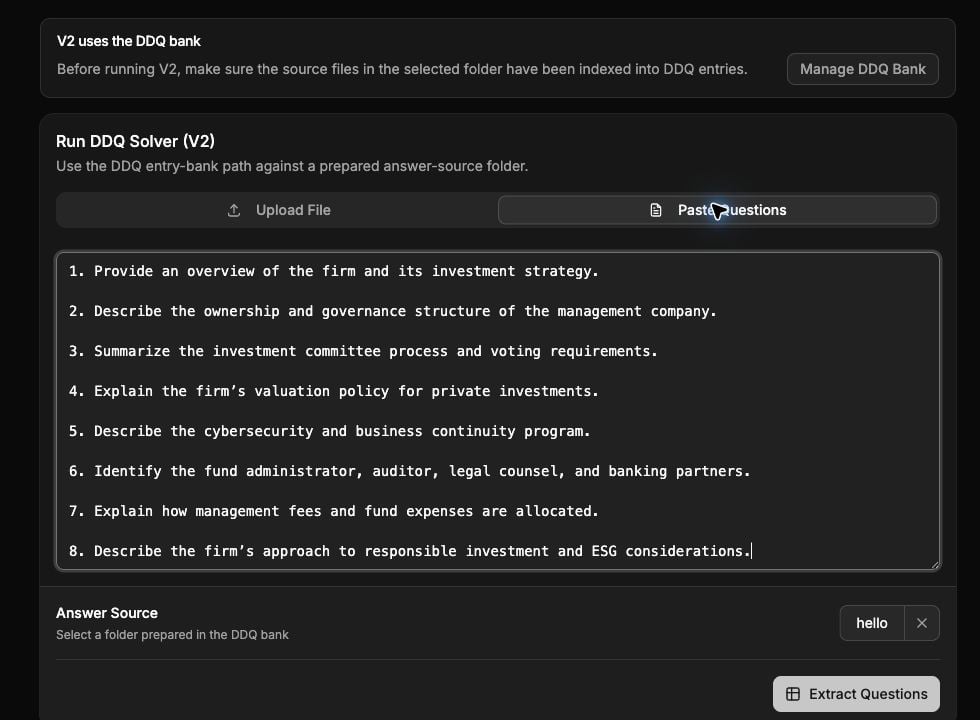
The current DDQ Solver uses a prepared DDQ bank. This staging example uses eight fictional questions and an approved-answer source with fictional Northwind content.
1
Open DDQ Solver
Go to Automations → DDQ Solver. Click Answer DDQ. If no bank source has entries yet, Metal shows Set up the answer bank first. Admins and Power users can click Set up the answer bank; everyone else needs to ask one of them to set it up.
2
Provide the questions
Choose Upload File or Paste Questions. File uploads support PDF, DOCX, DOC, TXT, XLSX, XLS, and CSV files up to 10 MB. Metal converts legacy Word
.doc files to DOCX when you upload them.3
Choose the answer source
Under Answer Source, choose one or more bank sources. The default is All sources, which includes every source with entries that you can access.
4
Extract the questions
Click Extract Questions. Metal creates the run and extracts the questionnaire into individual questions.
Review questions and generate answers
On the run page:- Review the extracted questions before answering begins.
- Remove headings, instructions, duplicates, or other rows that are not questions when the remove control is available.
- Click Start Answering. Metal processes each question against the selected bank sources. The run page lists the sources the run uses.
- Follow the progress counts for processed, answered, unanswered, and errored questions.
- If the run fails, review the error and use Retry after correcting the source or input problem.
Review the response
Treat the generated output as a sourced draft, not an automatically approved external response.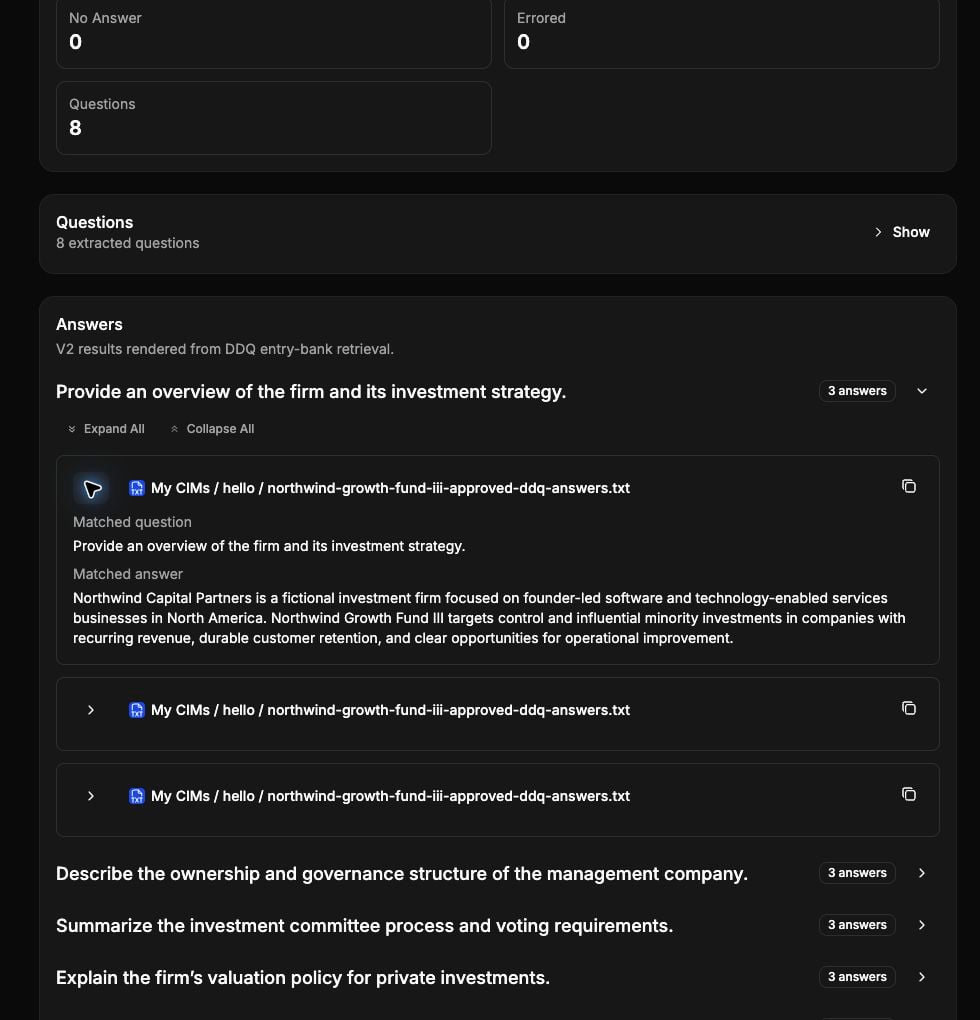
A completed DDQ Solver run shows processing status, retrieved answers, and the source material behind each draft. All data shown here is fictional.
- Read every answer for accuracy, scope, and fund-specific relevance.
- Open the supporting citation to inspect the source document and page.
- Investigate No answer found instead of filling the gap with an assumption.
- Escalate conflicting or outdated source material to the content owner.
- Confirm that legal, compliance, performance, and commercial statements have the required human approval.
Export the completed questionnaire
When the answer and export phases finish, click Download Filled Document on the run page. If you uploaded a questionnaire, Metal writes the drafted answers back into that file. For a legacy.doc upload, Metal writes the answers into the converted DOCX, so the download is a .docx file. Open the download and complete your firm’s final formatting and approval process before sending it externally.
Past runs remain available on the Runs tab of Automations → DDQ Solver. Use them to understand what was answered and which source material supported the run. For runs from the current engine, if a run fails partway through, Retry continues from the remaining questions. Runs created with the earlier folder-search version of DDQ Solver open as a Read-only run. You can still review their answers and citations and download their existing export, but the page has no retry, re-run, or edit controls. To answer the questionnaire from the DDQ bank, start a new run.
Troubleshooting
No bank sources appear
Open Automations → DDQ Solver → Settings and add a bank source. If you are not an Admin or Power user, ask one to add it. From a new run, Manage answer bank or Set up the answer bank also opens this tab. A source becomes available to runs after it has entries.A document is missing from the bank
Check the source’s folder-name rules in Edit rules. If the source only includes final, sent versions, open the source’s Decisions tab to see whether AI left the document out. An admin can click Include to add it.A source document is inaccessible
You need permission to the selected source material. Ask the workspace or folder owner to grant access, then reopen the run.Many questions return no answer
Check that you selected the correct fund or strategy sources, that their files finished indexing, and that the source material actually contains approved answers. Expand the source boundary only when the additional material belongs in the response context.The questionnaire does not extract cleanly
Remove decorative sheets, instructions, and merged layouts where practical, or use Paste Questions to provide a clean question set directly.Related
Run fundraising
Put DDQs into the broader IR and capital formation process.
Working with documents
Organize and permission the source material Metal uses.
Run workflows
Learn how workflow runs, outputs, artifacts, and permissions work.